



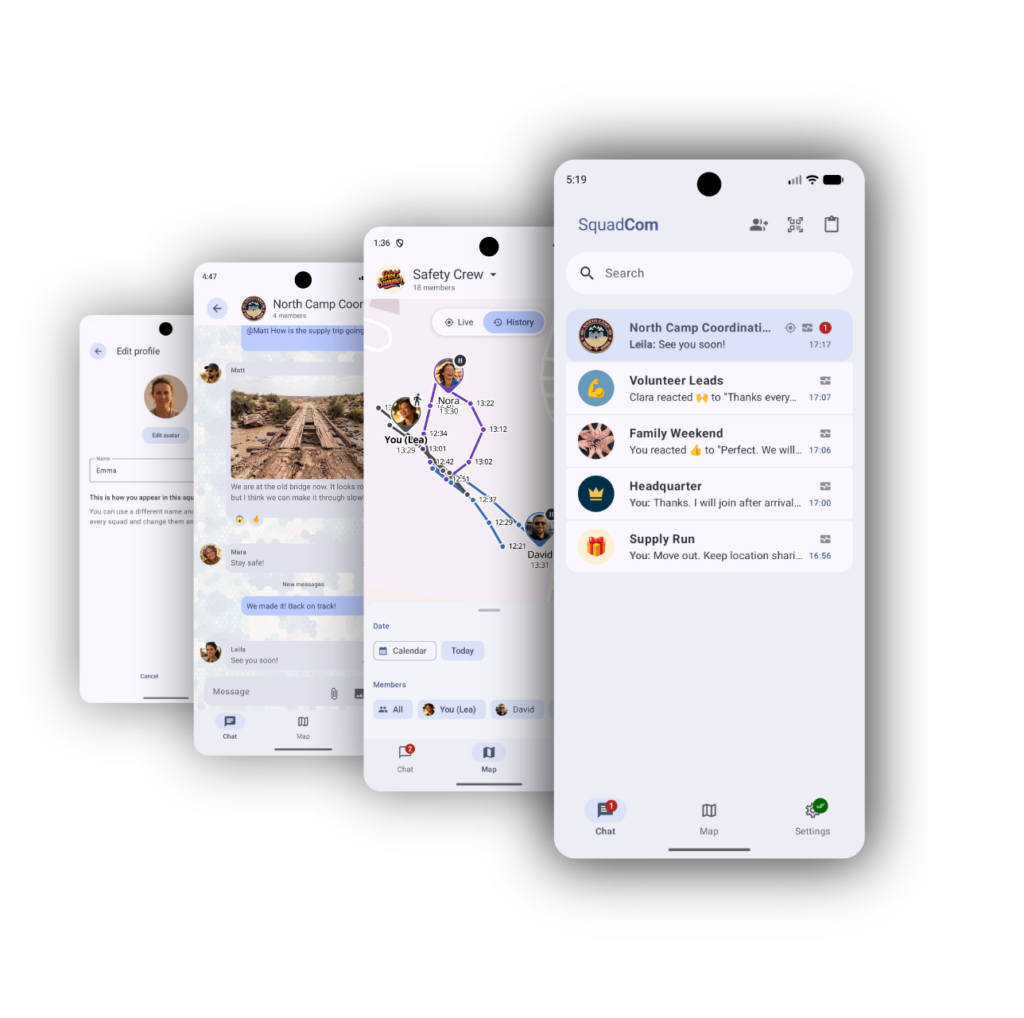
Product Vision
Three missions, one coordination challenge.
The video follows Emma, David and Mika through critical situations inspired by today’s real-world crises all over the world. It shows how teams stay connected, communicate, share information and navigate in tough environments with continuously changing conditions.

Security
Encrypted squad messaging
Messages are protected end-to-end and organized around squads, so approved members can coordinate in a shared trusted space. Messages are transferred directly to the recipients without any servers in between.
Simplicity
Instant onboarding
Teams can invite people with a link or QR code and keep membership controlled through approval inside the squad.


Data exchange
Text, voice, images, files and locations
SquadCom supports all the content teams actually exchange during coordination: messages, voice updates, images, PDFs, files and location updates.
Location-aware
Location sharing and map awareness
Teams can share positions manually or through configurable settings, then view recent locations, traces and movement context on a map.


Privacy-focussed
Message transport through Tor, Wi-Fi and Bluetooth
Tor is a network that provides an anonymous, privacy-preserving internet path through so-called onion services, while same-Wi-Fi communication connects nearby devices on a local network.
Local-only
Local message queues
Outgoing messages stay on the device, retry automatically if the recipients are temporarily not available and show delivery information as transport paths become usable again.


Anonymity
Extra login layer and optional names
App lock allows for an additional security layer to keep your communication hidden using device biometrics or pins, and users can choose arbitrary display names instead of providing real names.
User Interface Convenience
Search, replies, edits and reactions
Conversations support practical chat workflows including search, replies, edits, deletion and message reactions.

Current beta focus
SquadCom is completely free and unrestricted during public beta. We are looking for feedback especially from users and teams who operation in low-connectivity environments, from crisis response, civil protection, NGOs, journalists or security-sensitive teams.
FAQ
How do people join a squad?
Members can join through invite links or QR codes, and squad membership stays controlled through approval by a group admin.
How is this different from normal messengers?
Most messengers are built around central servers and user accounts. SquadCom is a peer-to-peer messenger that transfers messages directly to each recipient – end-to-end encrypted and taking whatever transport path is available.
How does SquadCom use Tor?
SquadCom can route communication through Tor onion services, giving devices an internet path that avoids direct IP address exposure.
Does SquadCom work worldwide?
Yes, with internet access, SquadCom can communicate over Tor-routed paths across distance. For local same-Wi-Fi communication, devices need to be reachable on the same local network.
How close do devices need to be?
For same-Wi-Fi communication, the practical range depends on the Wi-Fi network, devices and environment. Typically, this is in the range of 20 to 30 meters indoors and up to 100 meters outdoors.
What happens if there is no internet?
SquadCom can use local same-Wi-Fi communication when devices are on a shared local network, and it keeps messages queued locally for later delivery when a usable path returns.
What happens if there is no power?
Phones still need battery power. SquadCom can reduce dependence on servers, but it cannot charge devices. Yet, SquadCom works also if your device is only sporadically available and will receive and send pending messages whenever activated again.
Can SquadCom replace radio communication?
No single tool should be the only communication layer in a serious situation. SquadCom is designed to complement existing channels by adding encrypted messages, shared context, local queues and location updates.
What are the current restrictions?
The current beta is Android-focused, still being hardened and not independently audited. Same-Wi-Fi communication is local-network based, while internet-distance communication currently uses Tor.
What is coming next?
We are working toward local mesh technology so nearby devices can form more resilient paths without depending on internet access or a single Wi-Fi network.
Can users stay anonymous?
Users can choose display names and squad avatars, so a squad can coordinate without requiring real names inside the app.
What can I send?
The current app supports text, voice messages, images, PDFs, files, replies, reactions and location updates.